Identity review
Identify items from photos.
See the evidence before you list.
Itemingo reads the brand, model and part number from your photos and shows what it based each answer on. You check it, fix it if it is wrong, and approve it. Only then can a listing draft be made.
Every screen on this page is the real app on a sample workspace with made-up items. The demo needs no account and saves nothing.
What you see
Every answer comes with
the reasons behind it.
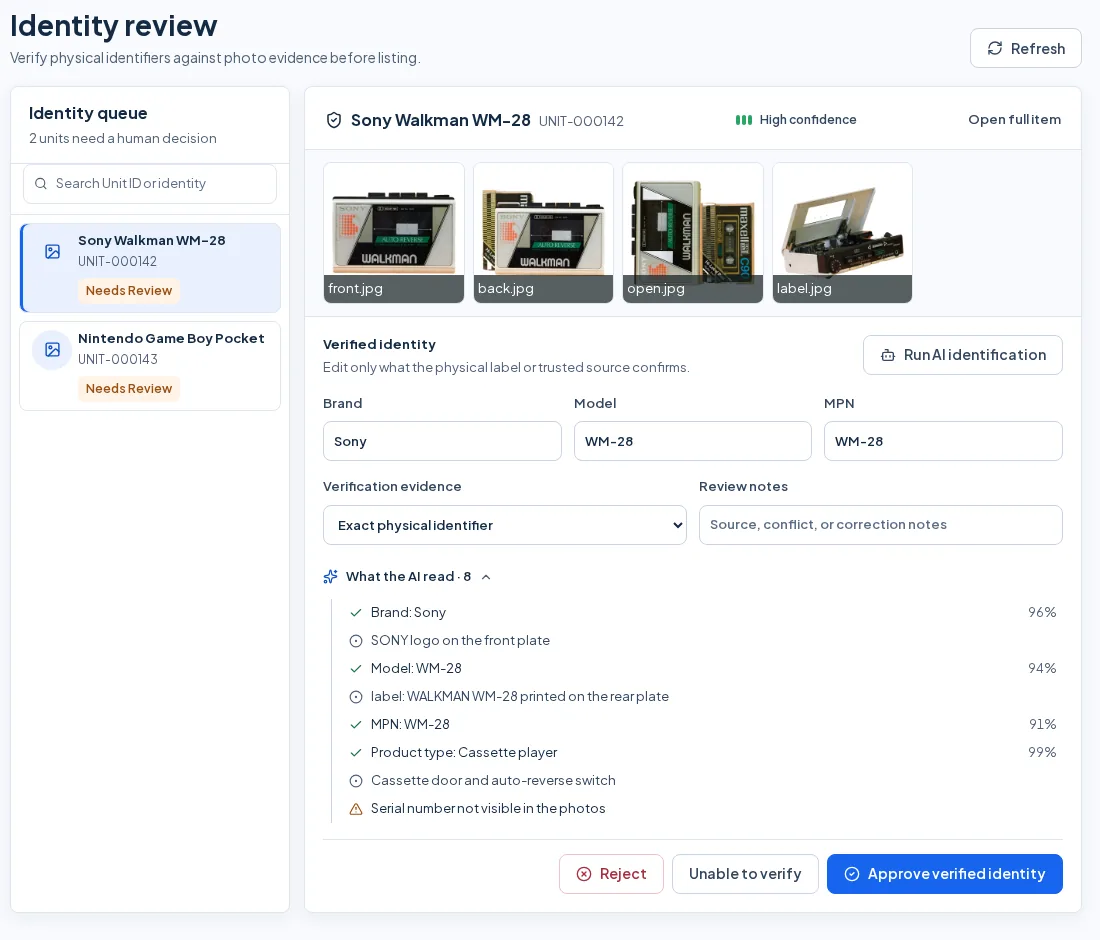
- Brand, model, part number and product type are read separately, each with its own percentage.
- Under each one is the evidence: text read from a label, a logo on the front plate, the controls on the case.
- A field it could not read is marked "not read from the photos" instead of being shown as an answer.
- Caveats are listed too, such as a serial number that is not visible in the photos.
- One meter covers the whole item. It follows the weakest of brand, model and part number that was read: High at 80% and up, Needs review from 50%, Low below that.
When the evidence disagrees
A conflict is shown,
not smoothed over.
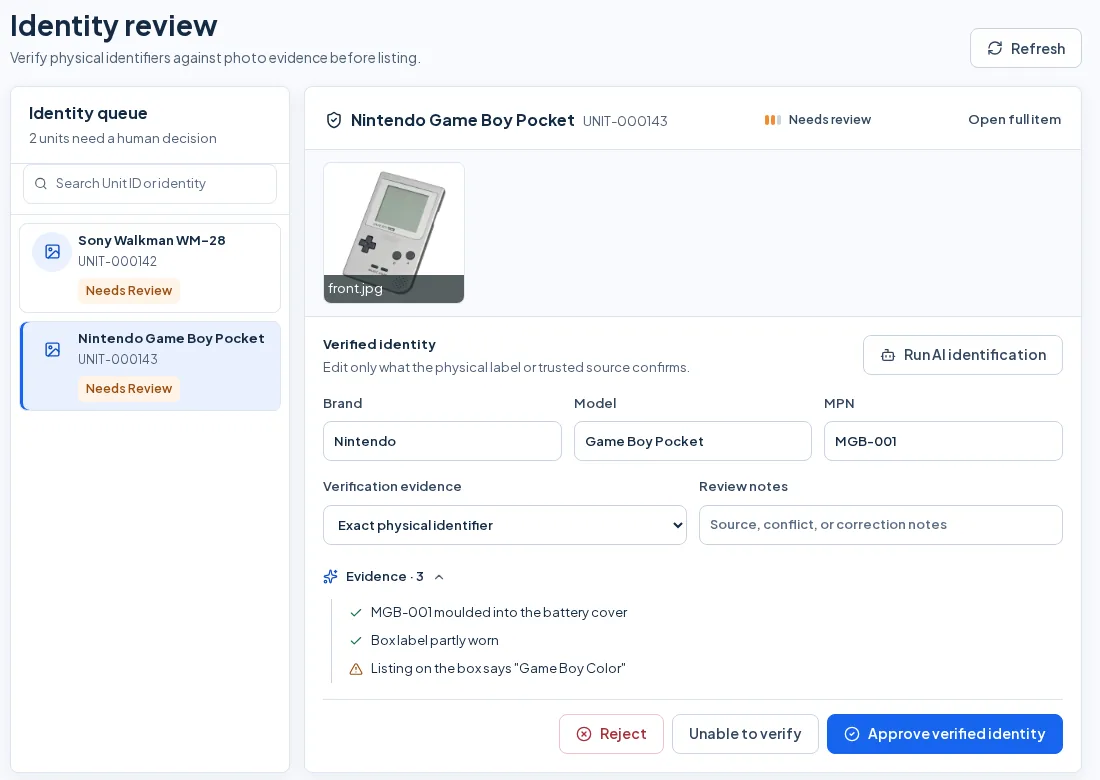
This sample Game Boy Pocket has one photo, a part number moulded into the battery cover, and a box that says "Game Boy Color". It shows as Needs review, and the conflict sits in the list next to the evidence.
You can change the brand, model or part number to what the label confirms. You also say how it was verified: an exact physical identifier, an official manufacturer source, several matching sources, a visual check only, or unverified. A note records the source or the conflict.
Your decision
Nothing moves on
until you decide.
Each item in the identity queue ends in one of three decisions.
Approve verified identity
Needs a brand and either a model or a part number. Itemingo then checks the item against ones you already entered. A possible duplicate goes to duplicate review and is never merged on its own.
Unable to verify
Records that the evidence was not enough. The item stays in Needs review and no listing draft can be made for it.
Reject
Throws out the proposed identity. The item goes back to Needs review for you to try again.
An approval is saved with who made it and how it was verified. Listing fields then show where they came from: Verified identity, Human confirmed, or Needs confirmation.
Then a second check
Is it worth listing?
List, lot or pass.
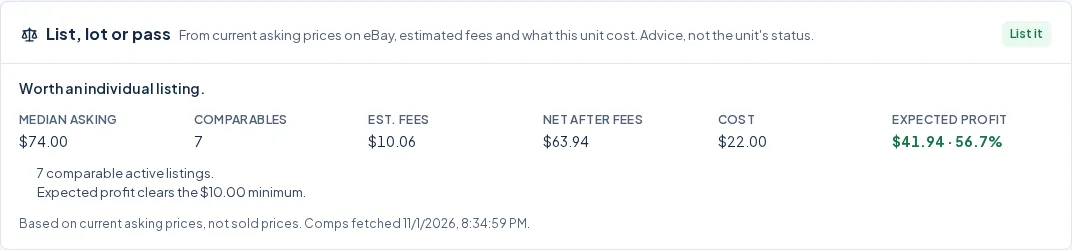
Each item gets a List, lot or pass card. It works from the asking prices of comparable active eBay listings, the estimated fees, and what the item cost you, and it shows every figure and reason.
- Median asking price, number of comparables, estimated fees, net after fees, cost, expected profit and margin.
- By default it says Lot it when the median asking price is under $15, or when expected profit is under $10 or the margin under 20%. It says Pass when the expected net is below what the item cost. You can change these limits in workspace settings.
- With fewer than three comparables it says the call is low confidence. With none it says "No call yet".
- It is based on asking prices, not sold prices, and it says so on the card.
What to expect
The plain limits
AI is optional and runs on credits
It never runs on its own. You start it on an item, and it uses AI credits, which come with the paid plans. The paid plans are not on sale yet. The Free plan has no AI credits, so you enter the identity yourself and approve it the same way.
It shows evidence, not a guarantee
A high percentage is a reason to look at the photos, not a reason to skip them. The review step exists because a reading can be wrong.
Nothing is posted for you
Listing drafts for eBay, Newegg and Whatnot wait for you to approve and post them.
Early access is by invitation
Email us to ask for an invitation, or try the demo first. It uses sample items and needs no account.
See where this fits in the whole job, from the intake photo to profit: how Itemingo works, or the plans.
Every unit.
Its true profit.
Itemingo is invite-only while we finish building it. Email us to ask for early access, or try the live demo first: it needs no account.
Already using Itemingo? Sign in to your workspace.